베타 곧 시작Beta soon 예배 · 세션용 멀티트랙 재생 앱Multitrack playback for worship and live sessions
Cuelight 다음 섹션, 소리가 먼저 알려 줘요Hear what’s next before it happens
스템 폴더를 끌어다 놓으면 몇 분 만에 무대 준비가 끝나요. 클릭과 가이드 음성이 팀 모두를 같은 박에 세우고, 무대 위에서는 실수해도 흔들리지 않아요. Drop in a folder of stems and you’re stage-ready in minutes. The click and spoken cues keep the whole band on the same beat — and the show keeps going, even when someone slips.
Mac · iPad · iPhone으로 먼저 나와요. Android · Windows는 그다음이에요. Coming first to Mac, iPad and iPhone. Android and Windows next.
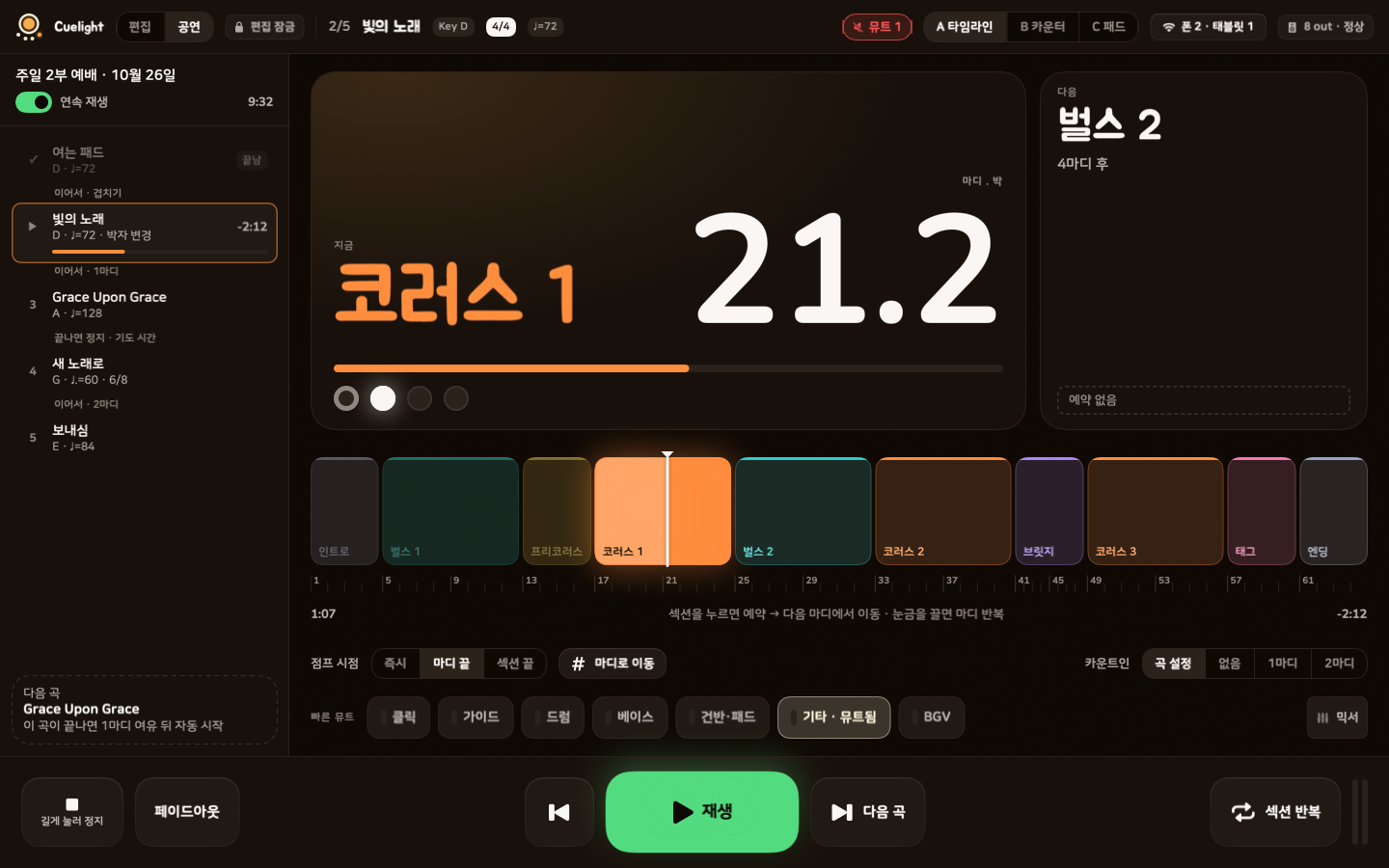
공연 모드 · 타임라인 화면Performance mode, timeline view
소리가 먼저 알려 줘요Spoken cues
눈은 악보에, 귀는 다음 섹션에Eyes on the music. Ears on what’s next.
클릭과 가이드 음성은 앱이 템포 맵과 섹션으로 직접 만들어요. 편곡을 바꾸거나 섹션을 건너뛰어도 큐가 정확한 박에 따라와요. Cuelight builds the click and the spoken guide from your tempo map and sections. Rearrange the song or jump ahead, and every cue still lands on the right beat.
기본 목소리 들어 보기Try the built-in voices
소리가 나요 · 96 BPM 클릭과 함께Sound on · played over a 96 BPM click
목소리 6개Six voices
말Language
눌러서 듣기Tap to listen
앱에서는 섹션마다 큐를 1마디 전 · 2박 전 · 끄기 중에서 골라요. 기본 목소리가 아니라 내 목소리로 단어마다 녹음해 넣을 수도 있어요. In the app, each section’s call can come one bar early, two beats early, or not at all. You can also replace the built-in voice with your own, recorded word by word.
카운트인Count-ins
첫 박 전에 박을 세어 줘요. 곡 중간의 섹션이나 마디에서 시작해도 그 자리 박자 · 템포로 세어요.A spoken count before the downbeat. Start from any section or bar, and it counts you in at that spot’s meter and tempo.
하나 · 둘 · 셋 · 넷one · two · three · four섹션 큐Section calls
섹션 한 마디 전에 이름을 부르고 박을 이어서 세어요. 다음에 뭐가 오는지 모두가 같이 알아요.One bar out, it names the section and counts you in, so everyone knows what’s coming.
코러스 · 둘 · 셋 · 넷Chorus · two · three · four박자 바뀜 알림Meter changes
박자가 바뀌는 섹션 앞에서 새 박자를 미리 말해요. 6/8이든 7/8이든 넘어가도 당황하지 않아요.Before the time signature shifts, it calls the new one — so a jump to 6/8 never catches anyone off guard.
식스에잇six-eight빠른 곡도 또렷하게Clear at any tempo
다음 박 전에 다 말하기 어려운 빠른 곡에서는 음높이는 그대로 두고 최대 2배까지 빠르게 말해요.When a word won’t fit before the next beat, it speeds up — up to 2× — without changing pitch.
무대에서 안전Stage-safe
실수 한 번에 곡이 멈추지 않게One slip won’t stop the song
큰 글씨와 큰 버튼, 멀리서도 읽히는 화면. 실수하기 쉬운 동작은 한 번 더 막아 줘요. Big type, big buttons, and a screen you can read from across the stage. The moves that are easy to fumble get an extra layer of protection.


공연 모드 · 편집 잠금Performance mode
공연 모드에서는 편집이 잠기고 버튼이 커져요. 실수로 곡이 바뀔 일이 없어요.Editing locks and the controls get bigger. Nothing changes by accident.
정지는 길게 누르기Press and hold to stop
정지는 0.6초를 눌러야 해요. 스치듯 닿아서는 멈추지 않아요. 부드럽게 끝내는 페이드아웃 정지도 있어요.Stop takes a deliberate 0.6-second hold, so a stray tap won’t end the song. Want a softer landing? Use fade-out stop.
점프는 예약하고 넘어가기Jumps wait for the bar
섹션을 누르면 '예약됨'으로 보이고, 다음 마디나 섹션 끝에서 넘어가요. 마음이 바뀌면 취소하면 돼요.Tap a section and it’s queued, then the jump lands on the next bar or at the end of the section. Changed your mind? Cancel it.
끊겨도 재생은 계속The host keeps playing
소리는 호스트 한 대만 내요. 리모트 폰의 연결이 끊겨도 재생은 이어지고, 폰은 다시 연결을 시도해요.Only the host makes sound. If a remote drops off the network, playback carries on while the phone reconnects.
출력 안전 잠금Output safety lock
클릭과 가이드는 FOH(객석 스피커)로 표시한 출력에 배정할 수 없어요. 카운트가 객석으로 새지 않아요.Click and guide can’t be routed to any output marked FOH, so your count-ins never leak into the house.
멀리서도 읽히는 화면Built to be read at a glance
지금 섹션, 마디.박, 다음 섹션까지 남은 마디를 크게 보여 줘요. 타임라인 · 카운터 · 패드 중에서 골라요.The current section, bar and beat, and bars until the next section, all in big type. Choose timeline, counter or pads.
빠른 준비Fast prep
폴더 하나로 몇 분 만에 무대 준비From folder to stage in minutes
특정 스토어 곡에 묶이지 않아요. 가지고 있는 멀티트랙 폴더나 zip이면 돼요. 곡 하나를 몇 분이면 무대에 올릴 수 있어요. No store lock-in — bring any multitrack folder or zip you already have. A song goes from folder to setlist in minutes.

기기가 하나처럼One rig, every device
데스크톱 · 태블릿 · 폰이 한 무대처럼Desktop, tablet and phone, playing as one
모든 기기에 같은 앱을 써요. 기기마다 역할만 달라요. 인터넷도 로그인도 필요 없어요. It’s the same app on every device — each one just plays a different role. No internet, no sign-in.
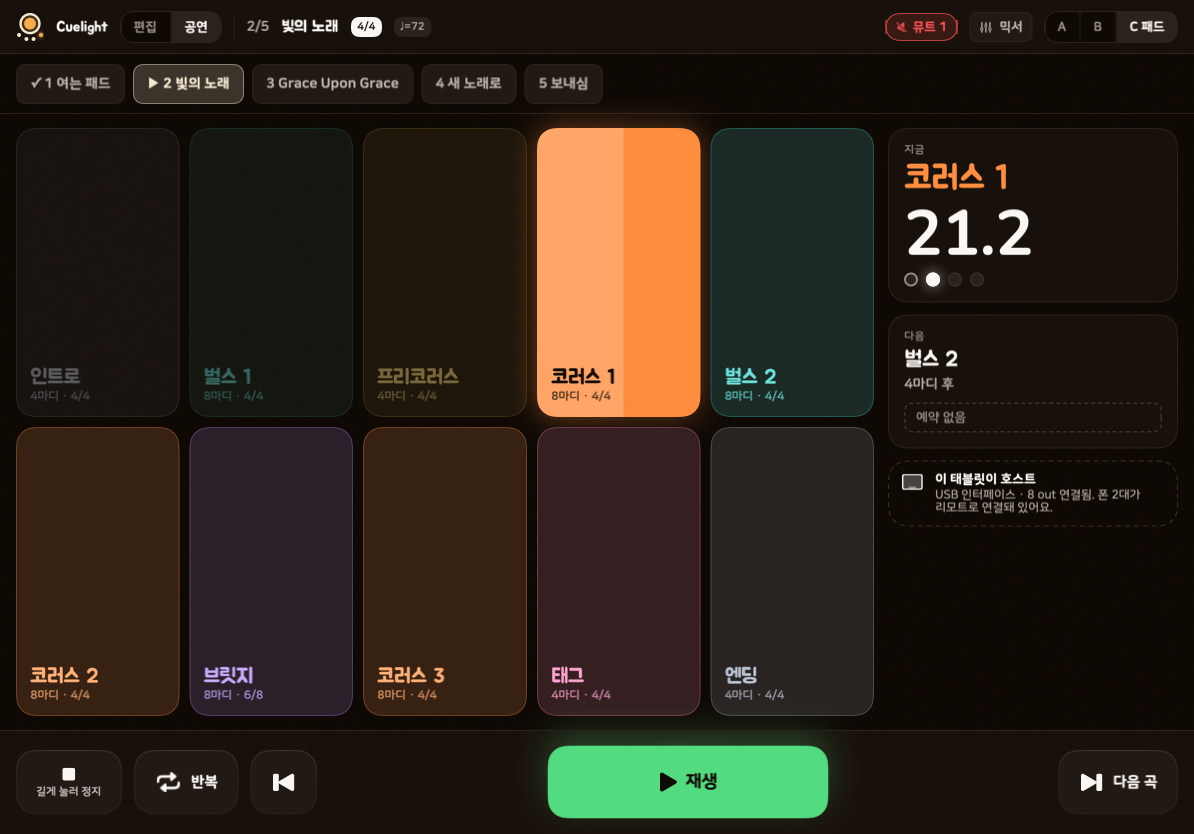
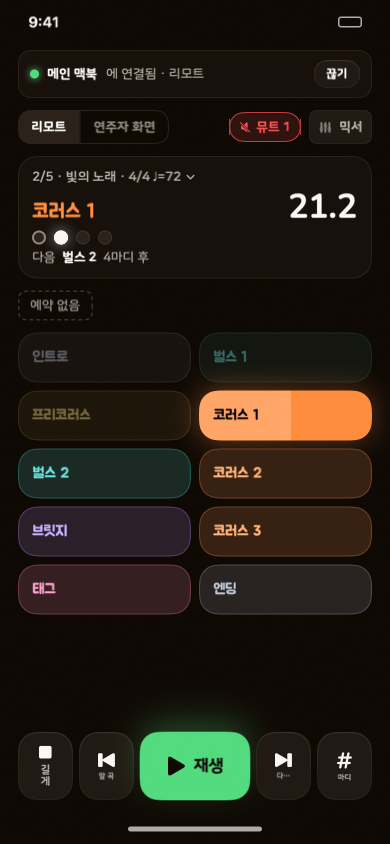
데스크톱Desktop
편집기에서 곡을 준비하고, 멀티아웃 오디오 인터페이스로 메인 재생을 맡아요.Prep songs in the editor, then run the main show through a multi-output audio interface.
태블릿Tablet
USB 오디오 인터페이스를 꽂아 재생기로 쓰거나, 큰 섹션 패드로 리모트를 맡아요.Plug in a USB audio interface and make it the player — or use it as a big touch remote with section pads.
폰Phone
리모트나 보면대 위 연주자 화면이 돼요. 작은 무대에서는 2채널 분리로 재생기도 돼요.A remote, or a player view on the music stand. In smaller rooms it can even run the show over a two-channel split.
QR 한 번이면 연결One scan and you’re connected
- 1
호스트에서 '기기 연결'을 눌러요.Tap “Connect devices” on the host.
- 2
폰으로 QR을 비춰요. 안 되면 4자리 코드로.Scan the QR code with your phone — or type a 4-digit code.
- 3
역할을 골라요. 리모트 또는 연주자 화면.Pick a role: remote or player view.
같은 Wi-Fi나 핫스팟이면 돼요. 연결이 안 되면 무엇을 확인할지 앱이 알려 줘요.Any shared Wi-Fi or hotspot works. If the network gets in the way, the app shows you what to check.


그 밖에도And there’s more
리허설부터 본 무대까지 필요한 것들Everything from rehearsal to the real thing
셋리스트 연속 재생Continuous setlists
곡이 끝나면 여유 마디 동안 다음 곡 템포로 클릭이 나오고, 가이드가 다음 곡 제목을 읽은 뒤 카운트인으로 이어가요.Between songs you get spare bars of click in the next song’s tempo. The guide reads out the next title, then the count-in carries you in.
파일 없이 새 곡New songs, no files needed
스템이 없어도 섹션을 차례로 쌓으면 클릭과 가이드만 있는 곡이 돼요. 스템은 나중에 넣어도 돼요.No stems yet? Stack up the sections and you’ve got a song with click and guide. Add the stems whenever you’re ready.
섹션 · 마디 반복Section and bar loops
지금 섹션이나 원하는 마디 구간을 반복해요. 몇 번 돌지도 정할 수 있어요.Loop the current section or any range of bars, and set how many times it repeats.
템포 변화 · 프리템포Tempo ramps and free timePro
점점 빨라지는 구간, 클릭 없이 흐르는 구간, 멈춰서 기다리는 구간까지 돼요.Gradual speed-ups, click-free rubato passages, or a hold that waits until you’re ready.
어떤 박자든Any time signature
4/4 · 6/8은 칩으로, 7/8 · 13/16 · 15/16 같은 박자는 분자 · 분모를 직접 골라요. 박자 18가지가 바뀌는 예시 곡 '변박 연습곡'이 들어 있어요.Common meters are one tap away; for 7/8, 13/16 or 15/16 just pick the top and bottom numbers. A built-in practice song runs through 18 different meters.
클릭은 취향대로A click you’ll like
기본 · 우드블록 · 하이햇 · 비프 4종. 8분 · 16분 · 셋잇단 서브디비전과 강박 크기도 골라요.Four sounds — standard, woodblock, hi-hat and beep — plus 8th, 16th and triplet subdivisions and an adjustable accent.
단축키 · MIDI · 페달Keys, MIDI and pedals
키보드 단축키, '배우기'로 한 번 밟아 정하는 MIDI 풋스위치, 블루투스 페이지 넘김 페달까지.Keyboard shortcuts, MIDI footswitches you assign with a single press using Learn, and Bluetooth page-turner pedals.
그룹 믹서 · 스템 팬Group mixer and stem pan
클릭 · 드럼 · 베이스 같은 그룹 볼륨과 스템마다 팬. 리모트에서 바꿔도 같이 바뀌어요.Group faders for click, drums, bass and more, plus per-stem panning. Changes from a remote show up everywhere.
출력은 장소마다Outputs for every venue
간단한 2채널 분리(왼쪽 클릭 + 가이드, 오른쪽 반주)나 그룹별 멀티아웃. 장소마다 프리셋으로 저장해요.A simple two-channel split (click and guide left, band right) or full multi-out by group. Save a preset for each venue.
클릭 · 큐 내보내기Click and cue exportPro
곡이나 셋리스트 전체의 클릭과 가이드를 오디오 파일로 내보내요. 다른 재생기나 DAW에서 팀 스템과 같이 써요.Export the click and guide for a song or a whole setlist as audio files, ready to run alongside your stems in another player or DAW.
내 메모Personal notes
연주자 화면에서 섹션마다 메모를 남겨요. 내 기기에만 저장돼요.Leave yourself a note on any section in the player view. It stays on your device.
동기화 · 자동 백업Sync and backup
Apple 기기끼리는 iCloud로 맞추고, 데스크톱은 라이브러리를 클라우드 폴더에 둬요. 고른 폴더로 자동 백업도 해요.Sync across Apple devices with iCloud, keep a desktop library in a cloud folder, and back up automatically to any folder you choose.
배우기Learn as you go
곡 만들기, 셋리스트, 공연, 출력, 폰 리모트까지 할 일마다 튜토리얼이 있어요. 말풍선이 단추를 하나씩 짚어 줘요.Step-by-step tutorials for every job: making songs, setlists, the show, outputs and the phone remote. Tips point to each button in turn.


요금Pricing
무료로 시작하고, 필요하면 ProStart free. Go Pro when you need more.
가입 없이 무료로 써요. 내보내기 · 멀티아웃 · MIDI처럼 더 큰 무대에 필요한 기능은 Pro에 있어요. 정식 출시 뒤에 Pro는 구독이나 평생 구매로 써요. Free to use, no sign-up. Pro adds what bigger stages need — cue export, multi-out, MIDI and more. After launch, Pro is a subscription or a one-time purchase.
베타 동안은 Pro 기능까지 모두 무료예요Everything, Pro included, is free during the beta
무료Free
곡 준비부터 공연까지, 기본은 다 있어요The essentials, from prep to the stage
0원$0
- 곡 가져오기 · 셋리스트 · 연속 재생Song import, setlists and continuous playback
- 어떤 박자든Any time signature
- 클릭 · 기본 목소리 6개로 가이드Click and spoken cues in six built-in voices
- 공연 화면 3가지 · 반복 · 그룹 믹서Three performance views, loops and the group mixer
- 2채널 분리 출력Two-channel split output
- 폰 리모트 · 연주자 화면Phone remote and player view
- 안전 기능(편집 잠금 · 길게 눌러 정지 · 출력 안전 잠금)Safety: locked editing, hold-to-stop, output lock
- 키보드 단축키 · 블루투스 페이지 넘김 페달Keyboard shortcuts and Bluetooth page-turner pedals
- iCloud · 폴더 백업iCloud and folder backup
- 파일 없이 새 곡 만들기New songs without audio files
- 공연 한 번에 4곡까지Up to 4 songs per performance
Cuelight Pro
무료의 모든 것에 더해Everything in Free, plus
- 클릭 · 큐 내보내기(곡 · 라이브)Click and cue export (songs and full sets)
- 내 목소리로 가이드Spoken cues in your own voice
- 멀티아웃 · 출력 3개 이상 · 장소별 프리셋Multi-out: 3+ outputs and presets for each venue
- 편곡 편집 · 복제 · 빼기 · 순서Arrangement editing: duplicate, drop, reorder
- MIDI 풋스위치 · 블루투스 MIDIMIDI footswitches and Bluetooth MIDI
- 템포 변화 · 프리템포Tempo ramps and free time
- 공연 곡 수 제한 없음Unlimited songs per performance
연간Yearly14일 무료14 days free
69,000원 / 년$49.99 / year
월 5,750원꼴About $4.16 a month
월간Monthly14일 무료14 days free
7,900원 / 월$5.99 / month
평생Lifetime
179,000원$129.99
한 번 결제Pay once
- 결제는 App Store에서 해요. 구독은 언제든 해지할 수 있어요.Payment goes through the App Store. Cancel anytime.
- 구독이 끝나도 만든 곡과 설정은 그대로 써요.If your subscription ends, your songs and settings keep working.
- 한 번 사면 같은 Apple ID의 Mac · iPad · iPhone에서 모두 써요.One purchase covers your Mac, iPad and iPhone on the same Apple ID.
- 금액은 나라마다 App Store 가격을 따라요.Prices follow your country’s App Store pricing.
자주 묻는 질문FAQ
궁금한 것Good questions
어떤 파일을 쓸 수 있나요?What files can I use?
스템별 오디오 파일이 든 폴더나 zip이면 돼요. WAV · FLAC · MP3를 읽고, 샘플레이트가 다른 파일은 맞춰서 가져와요. 특정 스토어 곡에 묶이지 않아요. 파일이 없으면 섹션만 쌓아 클릭 · 가이드만 있는 곡을 만들 수도 있어요.Any folder or zip of stems. Cuelight reads WAV, FLAC and MP3, and converts files at a different sample rate on import. You’re never tied to one store’s catalog. No files at all? Stack up sections and make a song with just the click and guide.
인터넷이나 로그인이 필요한가요?Do I need internet or an account?
아니요. 재생도, 기기 연결도 인터넷과 로그인 없이 돼요. 같은 Wi-Fi나 핫스팟이면 충분해요. iCloud 동기화처럼 클라우드를 쓸 때만 인터넷이 필요해요. 가입도 없고, Pro 결제는 App Store가 맡아요.No. Playback and device pairing work with no internet and no sign-in — a shared Wi-Fi network or hotspot is all you need. You’ll only need a connection for cloud features like iCloud sync. There’s no sign-up either: the App Store handles Pro payments.
오디오 인터페이스가 꼭 있어야 하나요?Do I need an audio interface?
아니요. 헤드폰 단자에 분리 케이블(TRS → 듀얼 모노)을 꽂으면 왼쪽은 클릭 + 가이드, 오른쪽은 반주로 나눌 수 있어요. 멀티아웃 인터페이스가 있으면 그룹마다 출력을 정해요.No. With a splitter cable (TRS to dual mono) in the headphone jack, you can send click and guide left and the band right. With a multi-output interface, you route each group to its own output.
클릭이 객석 스피커로 나가지 않을까요?Could the click end up in the house speakers?
출력 안전 잠금이 켜져 있으면 클릭과 가이드는 FOH로 표시한 출력에 배정할 수 없어요. 출력마다 테스트 톤으로 미리 확인할 수도 있어요.Not with the output safety lock on — click and guide can’t be assigned to any output marked FOH. You can also check every output with a test tone first.
리모트 폰의 연결이 끊기면 어떻게 되나요?What if a remote phone disconnects?
소리를 내는 건 호스트 한 대뿐이라 재생은 그대로 이어져요. 폰은 다시 연결을 시도하고, 그동안 화면에 상태를 보여 줘요.Only the host makes sound, so playback simply continues. The phone reconnects on its own and shows you its status in the meantime.
언제, 어떤 기기에서 쓸 수 있나요?When and where can I get it?
Mac · iPad · iPhone 베타(TestFlight)를 곧 시작해요. 베타 동안은 Pro 기능까지 모두 무료예요. Android · Windows는 그다음이에요. 소식은 이 페이지에서 알려 드릴게요.The Mac, iPad and iPhone beta (through TestFlight) starts soon, and everything — Pro included — is free while it runs. Android and Windows come next. News will land on this page first.
곧 무대에서 만나요See you on stage soon
Mac · iPad · iPhone 베타를 곧 시작해요. 베타 동안은 Pro 기능까지 모두 무료예요. 소식은 이 페이지에서 가장 먼저 알려 드릴게요.The Mac, iPad and iPhone beta starts soon, and everything — Pro included — is free while it runs. News will land here first.
- Mac
- iPad
- iPhone
Android · Windows는 그다음이에요Android and Windows next